Custom Construction Software: The Why Behind "Buy and Build"
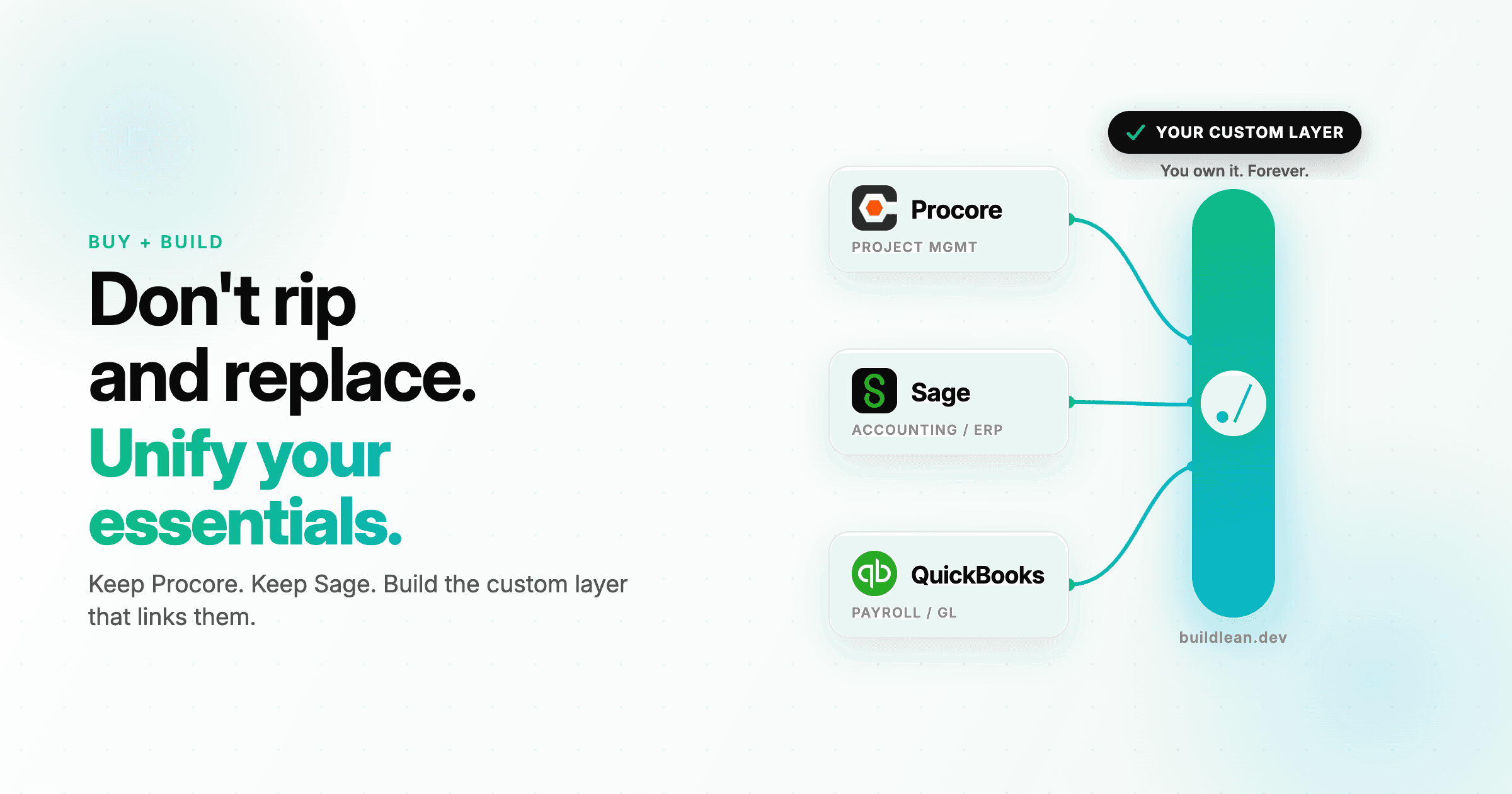
Guess what? You don't need to throw away Procore or Sage to get the exact software system your business requires. The fear of retraining fifty superintendents and three stubborn project accountants keeps most construction executives trapped in a spreadsheet frenzy.
You know your manual processes are costing you margin, but the threat of a failed software implementation feels worse.
The solution isn't to rip and replace your core platforms. You should buy the heavy commodity systems for accounting and project management, then build the custom connector layer that links them. This hybrid approach gives you custom performance without the multi-million-dollar risk of building a proprietary ERP from scratch.
Why Rip and Replace is a Trap
Off-the-shelf software excels at standardized tasks like general ledger accounting, accounts payable routing, and basic submittal logs. Building your own accounting engine from scratch is a waste of capital because QuickBooks and Sage already handle tax compliance and payroll perfectly.
If you try to build a custom ERP, you will spend most of your budget recreating features that your team already has.
The breakdown happens when you try to force these tools to handle your unique field workflows. Every general contractor wins jobs and manages field operations slightly differently. When you force your superintendents to use a clunky, off-the-shelf mobile app that doesn't match their real-world workflow, they eventually stop using it. They revert to paper, and your corporate office loses visibility into daily field logs and production tracking.
What does a buy and build workflow look like in practice?
Consider the path of a project budget from estimating to closeout. In a typical office, this involves manual data re-keying at least four times. An estimator wins a bid using specialized estimating software, then re-keys the line items into an Excel bid leveling sheet. Next, a project manager copies those numbers into Procore to set up the schedule of values. Finally, the accounting team manually enters the same data into Sage to set up the job costing codes.
This manual copying is where margin erosion begins. A single typo in a phase code can hide a budget overrun until it's too late to fix.
In a hybrid system, you use workflow and data automations to connect these tools. When the estimator marks a bid as won, the data automatically populates the bid leveling tool, creates the job in Procore, and builds the cost codes in Sage. Your people spend their time reviewing variances instead of typing numbers.
The Buy, Build, or Hybrid Decision Framework
Deciding which parts of your tech stack to build and which to buy comes down to competitive advantage. If a process makes your company unique or protects your margin, build it. If the process is a utility that every contractor performs the exact same way, buy it.
Use the framework below to guide your decision.
Business Function | Off-the-Shelf (Buy) | Custom Built (Build) | The Hybrid Approach |
|---|---|---|---|
Accounting & ERP | Sage, QuickBooks, or Vista handle tax compliance and GL. | Do not build. Recreating general ledger logic is expensive and risky. | Keep your existing ERP as the financial source of truth. |
Field Data Collection | Standard forms in Procore or Raken. | Custom mobile forms for unique self-perform labor tracking. | Collect field logs via a custom interface that pushes to Procore. |
Job Cost Analysis | Rigid reports that require exporting to Excel. | Proprietary dashboards that predict cost-to-complete. | Pull data from ERP and PM tools into one unified dashboard. |
How Bad Data Eats Construction Margin
Information gaps between the field and the office directly impact your bottom line.
A 2018 study by FMI Corporation and Autodesk revealed that construction professionals spend an average of 5.5 hours per week just looking for project data. For a mid-sized general contractor with 50 employees, that is nearly 300 hours of wasted labor every single week.
This waste shows up during the change order process. When a subcontractor requests a change in the field, the superintendent might approve it via text message. If that change is not immediately pushed to the accounting system, the project manager will approve a pay app that does not reflect the new scope. By the time the bill arrives, the margin on that phase has already disappeared. Connecting these systems ensures an approved field change hits the pay app before the bill arrives.
Choosing Custom Construction Software Development the Right Way
You do not need a massive IT department to implement a modern software strategy.
When you focus on targeted integrations, you can preserve your investment in tools like Procore while gaining the competitive advantage of proprietary systems. We build these exact systems for growing contractors at BuildLean, specializing in custom construction software that connects your field data to your back office.
Frequently Asked Questions (FAQs)
Do we have to replace Procore or Sage to get custom software?
No, you do not have to replace your existing tools. We design custom systems to sit alongside and connect your current platforms. This allows you to keep using Procore for project management and Sage for accounting while eliminating the manual double-entry between them.
How much does custom construction middleware cost?
The cost depends on the number of systems you are connecting and the complexity of your workflows. Every build is a fixed price, agreed before we write code. A focused tool, like an automation that syncs job setup data between tools, starts at $1,500. Connected systems that tie job costing to Sage or QuickBooks start at $5,000, and full platforms with real-time dashboards and custom field apps start at $15,000. You can view our transparent pricing options on our pricing page.
What happens when Procore or Sage updates their software?
Modern cloud software uses stable application programming interfaces, or APIs, that do not break when the software gets updated. We build custom integrations using these official developer connections to ensure your workflows remain stable and functional even when platforms release new versions.
Ready to build? Book a free discovery call and walk us through how your team works today.
Share this article
Get Started
Let’s talk about your business.
Bring your questions, your current challenges, or an idea you’re exploring. In a free 30-minute call, we’ll discuss what you want to improve and where Build Lean could help.